
Before buying a Bluetooth dongle, identify which Windows problem you have
A missing Bluetooth control, an undiscoverable headset, and silent connected earbuds are different problems. Here is how to choose the next useful action.
Search for “Bluetooth not working” and buying a USB adapter soon appears as an answer. Yet the phrase covers different failures: no radio, no discovery, or audio going to the wrong destination after a connection. Identify your problem before adding hardware.
Find the part you need
A. The Bluetooth control is missing
Start with the computer rather than the headset. Check the manufacturer’s specification for a Bluetooth radio and inspect its status in Device Manager. Wi-Fi does not by itself establish Bluetooth support. If an existing feature disappeared after an update, investigate recognition and drivers before declaring the hardware absent.
Microsoft’s troubleshooting guidance includes its troubleshooter and driver checks. A third-party driver bundle is not the necessary first step. Use the appropriate manufacturer or Windows support path and verify whether the device returns after the change.
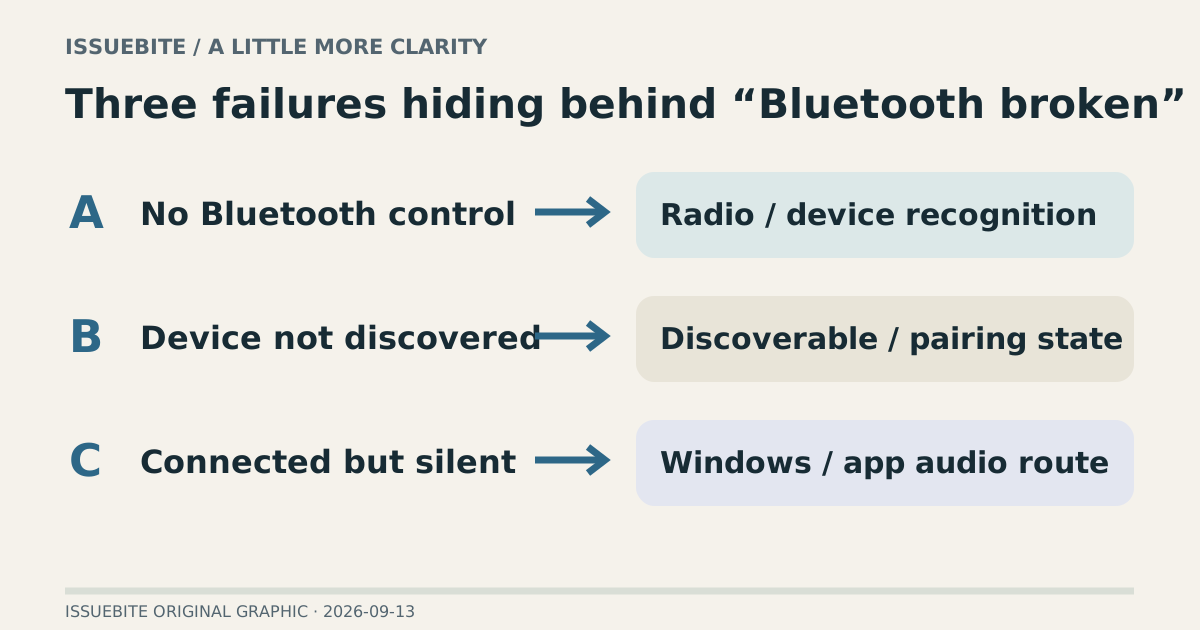
B. Bluetooth exists, but this headset is missing
A working Bluetooth keyboard establishes that the radio is not entirely absent. Check whether the headset remains connected to another phone and whether it is actually discoverable. Powered on is not the same as ready to pair. Follow the model-specific indicator instructions.
When re-pairing, pay attention to old connection records and the device’s current state. Repeating the same discovery attempt without changing either can reproduce the same failure. Trying one other known working device helps distinguish a general discovery problem from a device-specific one.
C. It is connected, but there is no sound
Open sound settings, not a retailer. Check the Windows output and the output selected inside the meeting or game application. An app can retain its own device choice. Music working while a meeting is silent is a particularly useful clue to application routing.
Dropouts are another symptom again. Vary distance and the surrounding wireless conditions while checking driver status. “Works at the desk, drops out in the living room” is a more actionable record than “Bluetooth broken.”
When an adapter is a reasonable purchase
Consider an adapter when the PC has no Bluetooth radio or when an isolated problem with the existing module makes replacement sensible. Check support for your Windows version and the vendor’s driver path. A larger Bluetooth version number alone does not guarantee every headset feature or solve every stability problem.
Reader conversation
Community ↗Questions, first-hand results and different perspectives are welcome. Counts reflect real member activity only.
Moderation
Sources and verification notes
- Microsoft — Fix Bluetooth problems in Windows ↗Checked 2026-09-13
What this source supports
- A. The Bluetooth control is missing