
Is a password notebook unsafe? Fix reuse before throwing it away
A Korean community debate asks whether writing passwords down is reckless. The useful answer depends on access, reuse, phishing and recovery—not simply paper versus an app.
A password notebook looks like a confession of bad security. Yet the familiar instructions pull in opposite directions: make every password difficult to remember, then never write anything down. A password-recording debate on the Korean aggregator AAGAG brings that contradiction into view.
The answer is conditional. A protected paper record is different from a note attached to a monitor; the UK’s NCSC does not impose a blanket ban on writing passwords down. But a well-hidden notebook cannot fix a password reused across several websites. Those are different routes to the same account.
Find the part you need
Start with who can reach the notebook
Paper has no internet connection, but its contents are not locked simply because they are offline. The NCSC warns that someone with access can copy a record without leaving an obvious trace. Hiding a note and controlling access to it are different things.
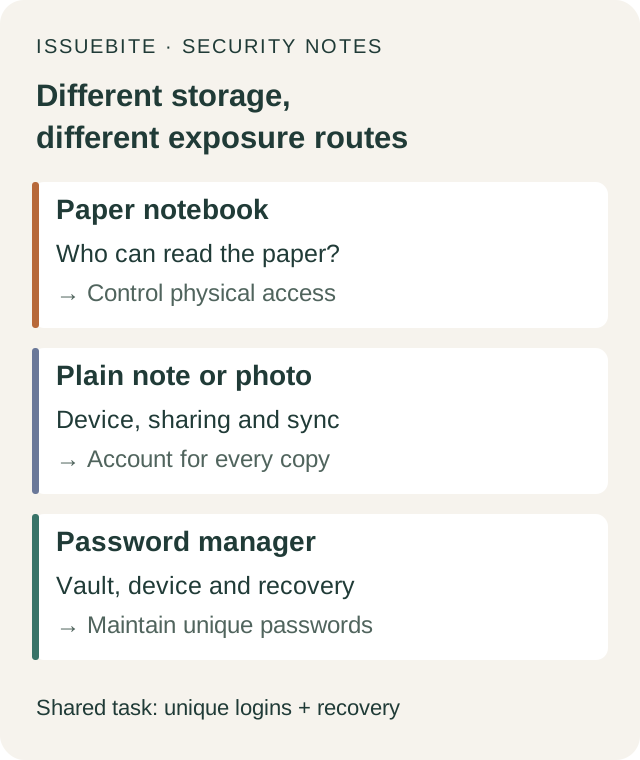
Consider two hypothetical arrangements: a record in a protected place at home, and a notebook carried in the same bag as a laptop. In the second arrangement, losing one bag may expose both the device and its login information. Where the notebook lives determines what one incident can take away together.
Photographing the pages changes the arrangement again. If the picture is backed up or shared with another device, there are now additional copies to account for. The relevant questions include the photo app’s sharing and sync settings. A digital photograph does not inherit the offline properties of the paper it depicts.
 Open full-size visual ↗
An old shopping account can connect to a current problem
Here is an illustrative scenario, not a reported breach. Someone uses the same password for an old shop and their current email. If the shop’s credentials leak, an attacker can try the combination elsewhere. Nobody needs to find the notebook. Reuse supplies the connection.
Adding a memorable variation to each password keeps the burden on human memory. A better fit for the task is a separate long, random password for each account—the properties CISA stresses. A password manager helps generate and retain those credentials without requiring someone to memorise every one.
If the backlog feels too large, begin with the email address that receives password-reset messages for other accounts. Check for reuse there, give it a separate password, and add two-step verification or a supported passkey. The service used most often is not necessarily the account with the widest consequences if lost.
A manager replaces a memory problem with a recovery decision
The first selection question is practical: can you keep using the tool on the devices where you actually sign in? A Windows computer and an Android phone, for example, need a workable arrangement on both. Otherwise the inconvenient device can become the place where duplicate passwords and improvised notes return. CISA specifically advises checking operating-system and device support.
Then examine locking and recovery. A useful vault does not make an unlocked device safe to leave with anyone. Keep device locking in place and use the additional authentication the manager supports. Recovery after forgetting a primary password or losing a phone differs between services; understand the particular arrangement before relying on it.
Migrate one account first. Save its new password and verify that you can sign in at the genuine website before continuing. Destroying the old record before the replacement works turns a security improvement into a lockout. This decision does not require buying a particular paid subscription.
A notebook cannot recognise a counterfeit login page
Even a carefully stored password can be handed to a fake website. Physical storage and phishing resistance solve different problems. If a manager does not offer the expected autofill on an unfamiliar address, pause and examine that address rather than immediately pasting the password. Autofill is not a promise to block every attack.
Passkeys change what is presented during sign-in. Instead of handing a reusable password string to a page, an authenticator proves possession of a cryptographic key associated with the service. FIDO and MDN explain the crucial boundary: a different, counterfeit origin cannot simply obtain and use the real service’s passkey as though it were a password.
That boundary does not eliminate device security or recovery decisions. Know where your passkeys sync and what happens when a device is lost or replaced. Rather than converting every account at once, start with a supported service whose sign-in and recovery arrangements you understand.
The codes Google explicitly lets you print
Google’s two-step verification guidance allows printing backup codes and keeping them with important documents in a safe place. They replace an unavailable second step; they are not a recommendation to print every account password. Each code becomes inactive after use, and creating a new set invalidates the previous set.
Think through the incident the backup is meant to survive. A recovery record kept only on a lost phone is unavailable when needed. A copy in an accessible drawer creates a different weakness. Ask both questions: could I retrieve this after losing my device, and could someone else read it?
Follow organisational rules for work accounts and any applicable storage conditions for personal services. The AAGAG debate supplies a question, not a security experiment proving that a particular habit works. An uneventful past is less useful for this decision than understanding how a failure would spread.
Reader conversation
Community ↗Questions, first-hand results and different perspectives are welcome. Counts reflect real member activity only.
Moderation
Sources and verification notes
- NCSC — Managing your passwords: Choosing to write passwords down ↗Checked 2026-09-15
What this source supports
- Start with who can reach the notebook
- An old shopping account can connect to a current problem
- A manager replaces a memory problem with a recovery decision
- A notebook cannot recognise a counterfeit login page
- The codes Google explicitly lets you print
- CISA — Use a Password Manager to Create and Remember Strong Passwords ↗Checked 2026-09-15
What this source supports
- An old shopping account can connect to a current problem
- A manager replaces a memory problem with a recovery decision
- FIDO Alliance — Passkeys and frequently asked questions ↗Checked 2026-09-15
What this source supports
- A notebook cannot recognise a counterfeit login page
- Google Account Help — Sign in with backup codes ↗Checked 2026-09-15
What this source supports
- The codes Google explicitly lets you print
- MDN — Passkeys: security properties and handling lost passkeys ↗Checked 2026-09-15
What this source supports
- A notebook cannot recognise a counterfeit login page
- AAGAG — 비밀번호 기록 논쟁: 주제 발견 경로 ↗Checked 2026-09-15
What this source supports
- The codes Google explicitly lets you print