
Your iPhone mirrors to the TV, but the video is black. Is Wi-Fi really the problem?
A missing receiver and a black video inside a working mirrored screen are different failures. Find where AirPlay stops before replacing network hardware.
Photos appear beautifully on the TV. Then the video you actually wanted turns black. Rebooting the router feels like the natural next move. But the working photos are a clue worth keeping: at least part of the display path already succeeded.
Find the part you need
First separate a missing receiver
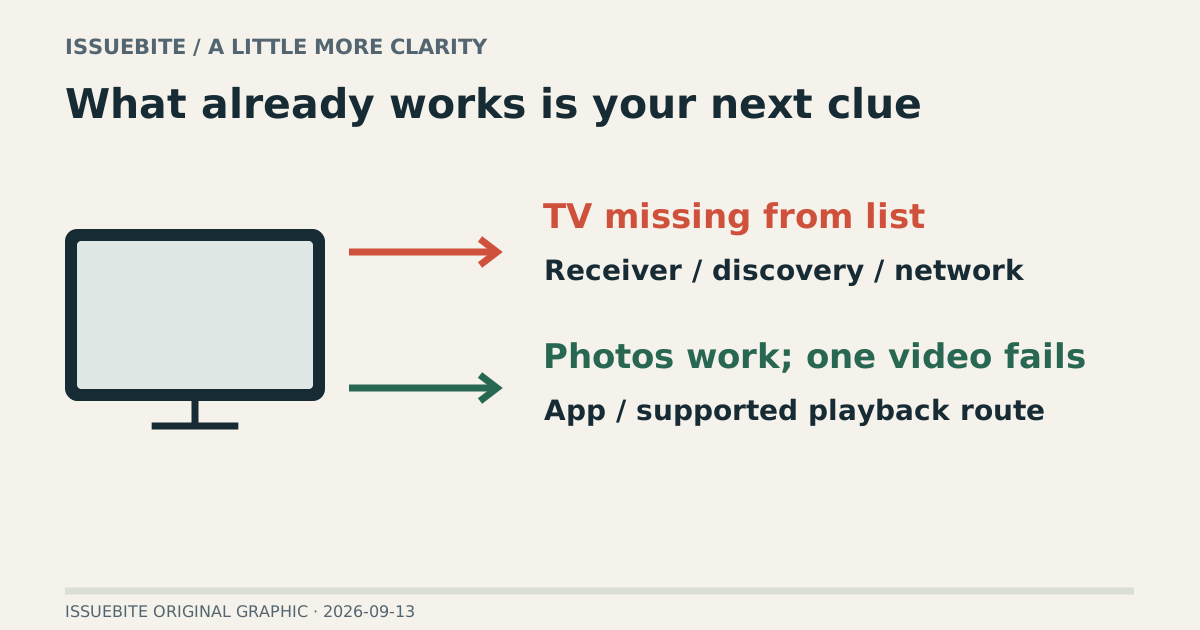
If the TV does not appear in Screen Mirroring, establish receiver compatibility, enabled AirPlay support, and the required network conditions. Apple’s guidance checks compatible devices, the same Wi-Fi connection, and software state. Discovery comes before the particular video app in this branch.
Do not confuse similarly named networks with the same usable local connection. Check whether one device is on a guest network. Establish that the receiver appears before investigating playback after connection.
Then separate a video-specific failure
If the general screen or photos work but one app’s video does not, check that app’s support for AirPlay and external playback. Apple notes that some video apps may not support AirPlay. More expensive networking equipment cannot change an application’s supported playback paths.
If the service offers an official TV app, that may provide another supported route. Check its device, region, and subscription conditions. Start with the service’s documented options rather than assuming an unknown mirroring utility will supply a reliable fix.
Sending a video and mirroring the screen are different choices
An in-app AirPlay control and whole-screen mirroring serve different purposes. Mirroring makes sense for showing photos or explaining an interface; a long video may be better served through the app’s supported playback route. The intended use should choose the control.
When sharing a TV, consider which notifications and personal screens mirroring may expose. A technically working connection is not the entire preparation. Opening the intended content first makes the shared-screen experience more comfortable.
A living-room diagnosis
Missing TV: investigate discovery and connection. One failed video app: investigate its supported route. Broad instability across content makes network comparison more relevant. Breaking “it does not show on the TV” into smaller observations preserves the parts that already work.
Reader conversation
Community ↗Questions, first-hand results and different perspectives are welcome. Counts reflect real member activity only.
Moderation
Sources and verification notes
- Apple — Stream video or mirror your screen ↗Checked 2026-09-13
What this source supports
- First separate a missing receiver
- Apple — Stream from iPhone with AirPlay ↗Checked 2026-09-13
What this source supports
- First separate a missing receiver
- Then separate a video-specific failure