
Higgsfield pricing (Sept 2026): Starter vs Plus vs Ultra
Higgsfield prices checked September 29, 2026: monthly Starter $19 (270 credits), Plus $59 (1,200) and Ultra $129 (3,000), or $19/$47/$99 a month billed annually, before tax. Turn your workload into a credit budget, then sign up or cancel with real screens.
Affiliate advertising · IssueBite may earn a commission if you purchase through links in this article.
As checked on September 29, Higgsfield costs $19 a month for Starter (270 credits), $59 for Plus (1,200 credits) and $129 for Ultra (3,000 credits) on monthly billing, before tax. Annual billing shows monthly equivalents of $19, $47 and $99, or $228, $564 and $1,188 over twelve months, so Starter costs the same either way. Do you need Ultra as soon as you sign up? No. You need a plan that can complete your actual job.
Start with signup and free access, then choose for your workload. Follow two actually generated perfume images; the video section covers input preparation, not a completed video. Finish with usage, renewal and cancellation.
The public Korean signup and pricing screens were checked on September 14, 2026, and the prices and credit amounts were rechecked unchanged on September 29. Prices are USD before tax and may vary with offers or accounts. Two earlier outputs are real generations; new practice screenshots show prepared inputs.
Find the part you need
1. Sign up: an account is not a subscription
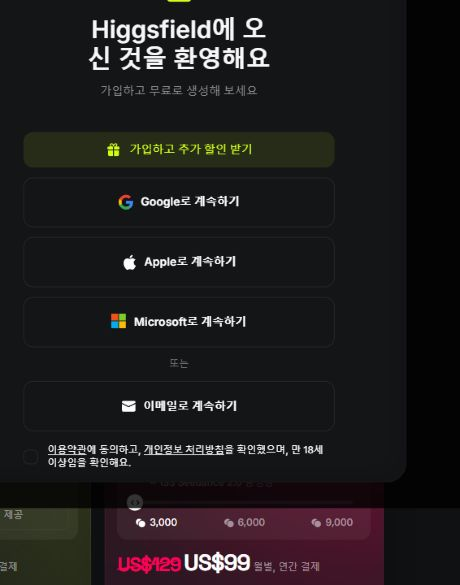
Open the official site and choose Sign up. The captured Korean dialog offers Google, Apple, Microsoft and email. Choose the identity you intend to keep using, especially if business billing should stay separate from a personal account.
Read the checkbox covering the Terms, Privacy Policy and being at least 18 before proceeding. Follow the selected provider’s authentication or the email flow shown next. We did not create a new account or accept terms for this guide.
The invitation to generate for free does not mean every model is unlimited. Official help describes limited model access without subscription credits. If a card-based trial or offer appears, distinguish it from account creation and read its conversion charge.
After signing in, check the account email and whether your chosen task is available without payment. If an existing subscription seems missing, check the identity before paying again. A completed signup screen was not captured.
 Open full-size screenshot ↗
2. Read the bill, not only the monthly-looking number
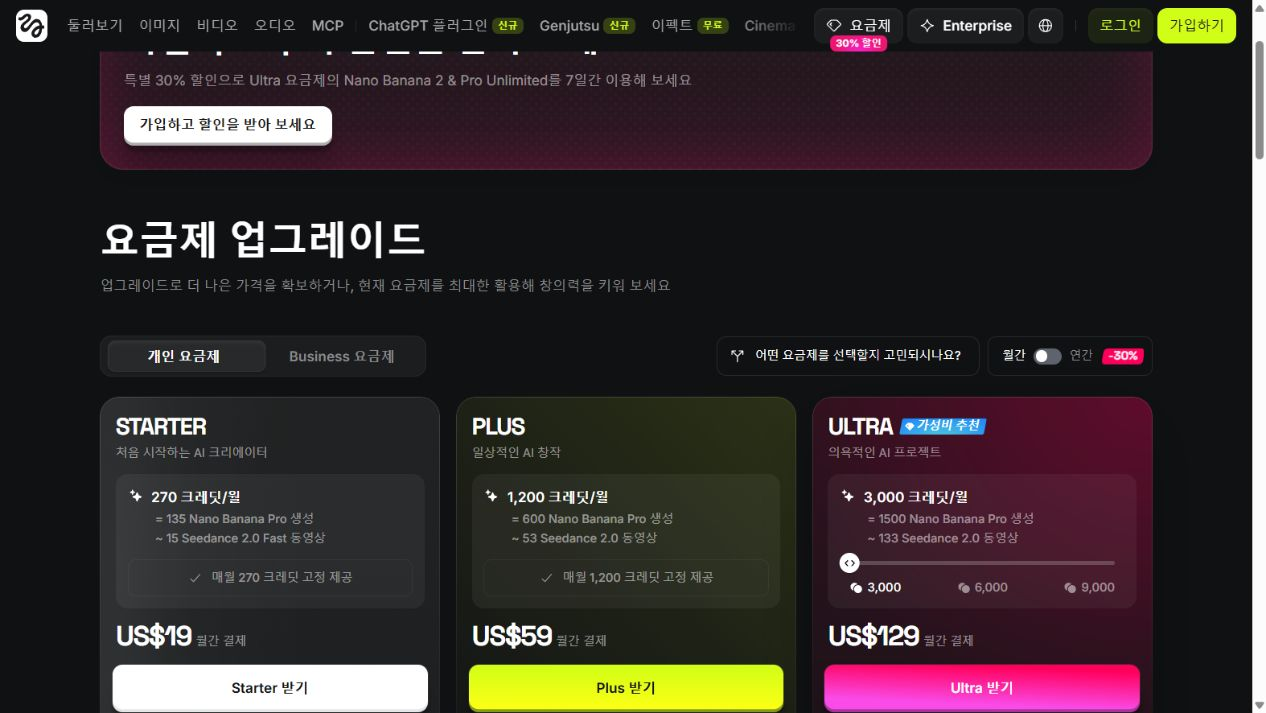
Monthly cards observed on September 14 and rechecked on September 29 show Starter $19 with 270 credits, Plus $59 with 1,200, and Ultra $129 with the 3,000-credit option selected. These are public USD prices before tax, not a checkout quote for every visitor.
Annual mode showed monthly equivalents of $19, $47 and $99. Multiplying by twelve gives $228, $564 and $1,188 before taxes or checkout offers. A $47 monthly equivalent is not the same commitment as a $47 monthly subscription. Check the total and renewal amount before purchase.
On the September 29 pricing page, Starter includes only Seedance 2.0 Fast and 2.0 Mini; Plus opens every Seedance model (the September 14 cards showed Seedance excluded from Starter). If you want to repeat the video example below with the same model, confirm it appears in your plan before paying. Required model first, price comparison second.
Unlimited has model, duration and resolution boundaries. Cards checked on September 14, 2026 advertised seven-day access for selected models, not permanent access for every task. Read the web-only restriction and queue terms. Help articles and promotional trial wording can differ; a card-based offer needs its own conversion-date and charge check.
 Open full-size screenshot ↗
3. Choose by workload rather than the creator label
For a curious beginner, start with the available free tools and learn to revise a brief. An annual discount is poor value if you have not yet found a useful result. Consider the smallest monthly option only when the required tool needs it.
For an image-focused blogger or solo shop, Starter is worth evaluating if its supported models cover the job. If product video or a Plus-only model is central, begin the comparison at Plus. Inspect any synthetic product image against the real object before using it to sell.
For a weekly video freelancer, retries and deadlines matter more than a professional title. Compare Plus when 1,200 credits cover the workload; evaluate Ultra when measured usage exceeds that or parallel work repeatedly becomes a bottleneck. A larger subscription does not automatically improve an identical prompt.
For a team needing shared assets and spend management, compare Business workspaces and pooled credits. These are editorial workload recommendations, not a reason to buy the highest tier because it carries a promotional badge or affiliate commission.
4. Turn your workload into a credit budget
Use finished outputs × attempts per output × credits per attempt. These examples are planning assumptions, not measured success rates. The observed pricing tool illustrates Nano Banana Pro at 2 credits per image and Kling 3.0 at about 14 for an eight-second 720p video.
Twenty images at three attempts each cost 20×3×2=120 credits. Ten videos at four attempts cost 10×4×14=560. Combined, 680 exceeds Starter’s 270 but fits within Plus’s 1,200, provided the required models are included.
Thirty videos at four attempts would need 1,680 credits. Compare Ultra at $129 monthly against Plus at $59 plus the currently offered top-up cost. Editing, upscaling and other models are excluded from these examples; recalculate from the actual Generate button.
Count usable outputs as well as attempts. If a hundred generations produce five assets you adopt, reducing the cost per accepted asset matters more than the advertised cost per credit. Use the first month to collect that evidence before increasing the commitment.
How many credits will your month of work take?
The output and attempt counts below are examples. Select your model, duration and resolution, then enter the cost shown beside Generate. This calculator does not transmit or save your inputs.
Formula: outputs × total generations × credits per generation. The reserve budgets for work beyond the attempts you entered; it is not a predicted success rate. Set it to 0% if unnecessary. Separate editing, upscaling and audio tasks are excluded. Enough credits do not guarantee access to the model you need.
What job would you actually give Higgsfield?
Higgsfield brings image and video generation, multiple models, editing tools and production studios into one service. Its September 14 interface lists Image, Video, Audio, Cinema Studio, Marketing Studio, Effects and Genjutsu. A long menu does not mean every feature is available in every plan or model. Check the input and output options for the route you intend to use.
For a solo business, sensible starting points include a product mood image, an editorial visual, or the opening frame of a short video. Separate tools also offer transformations of existing footage. The practical opportunity is to compare creative directions before committing to a larger shoot or edit—not to assume that photography has become unnecessary.
Exact colour references, connector layouts, material evidence, customer testimonials and performance comparisons require factual source material. A generated image can illustrate an idea; it should not silently become evidence about a product. Keep that distinction clear in both the workflow and the caption.
CASE 1 · Build a first product concept from text
Start from text when exploring a fictional product or a visual direction. If the job is an accurate listing photo of an existing product, begin with a reference photograph instead. The perfume in this guide is fictional; it is not evidence of a real product’s appearance.
Open Image, then Create Image. Check the model button beneath the prompt: the captured Korean interface labels it Nano Banana Pro. Describe the subject, materials, background and lighting, then specify changes you do not want. A concrete brief is easier to revise than an instruction to make something look premium.
Use the aspect-ratio button to choose 3:2 for this landscape concept. The capture also shows 1K and a 1/4 quantity control. Start with one output while finding the direction. Before generating, read the number beside the generation button and check your account’s credit terms. The displayed 2 is a snapshot, not a universal price.
This is an actual prepared input screen, not a completed generation screen. The result shown next was generated earlier for this guide using a longer brief; the shorter practice prompt does not guarantee an identical output.
 Open full-size screenshot ↗
Result one: establish the product before the scene
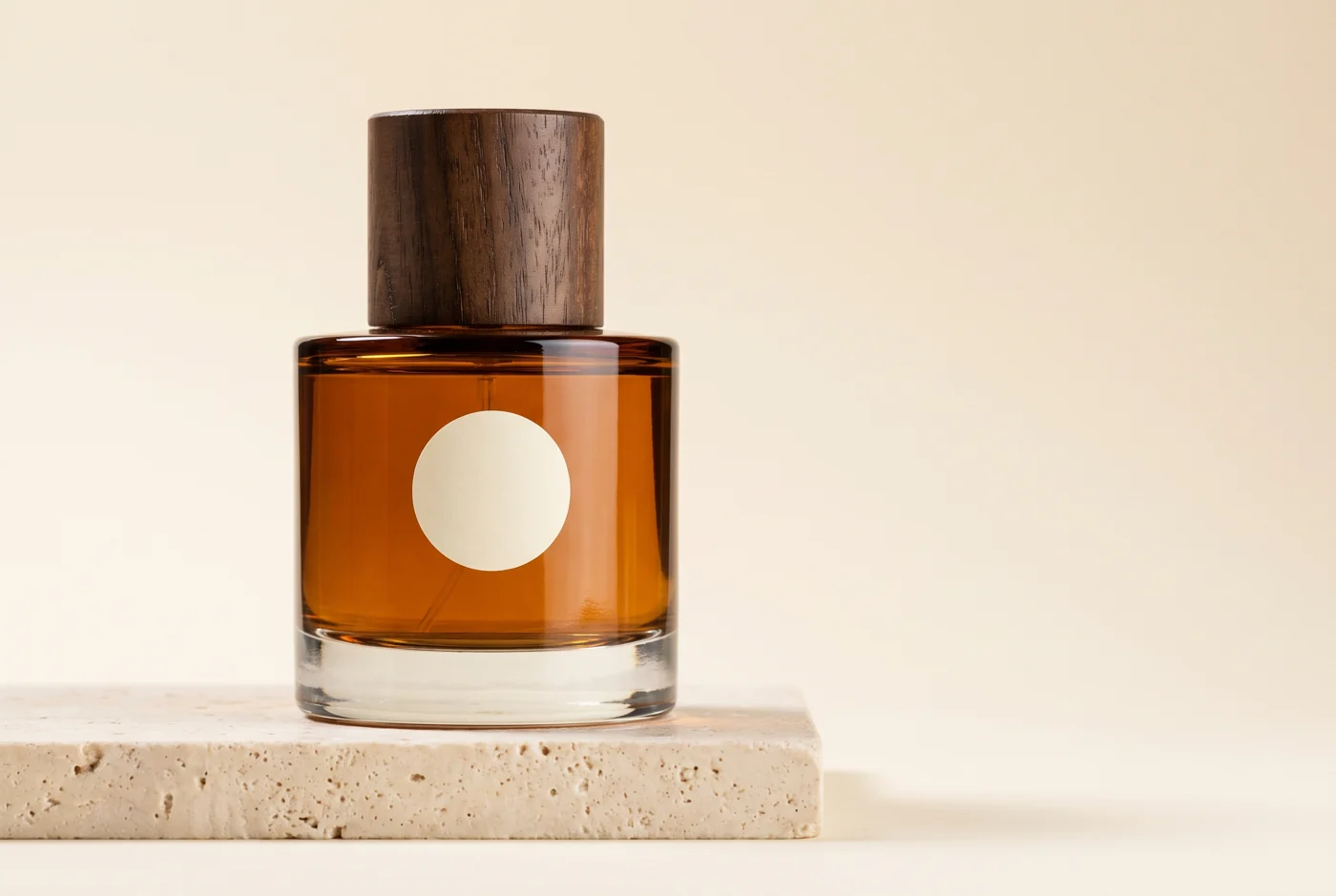
Our demonstration product is a fictional perfume bottle that is not for sale. The brief specifies amber glass, a thick clear base, a cylindrical walnut-coloured cap and a blank circular label. There is no brand or efficacy claim: the exercise is about visual direction, not promoting an invented item as a real product.
The first output places the bottle on a pale stone plinth in a studio-style scene. Look beyond the highlights. The outline separates from the background, and the wood cap and glass base read as different materials. This composition could introduce the object before a second image supplies context.
It is not a perfect transcription of the brief. We requested a short rectangular bottle; the output gives a strong impression of rounded, curved glass from the front. That can be acceptable when exploring a fictional design. It would be a reason to correct or reject the image if an existing square bottle had to be represented accurately. Plausibility and product fidelity are different review criteria.
Both completed outputs used 2K, a 3:2 ratio and one image per job. The 1K setting in the tutorial screenshot belongs to a later prepared input, not to these completed images. The request selected Nano Banana Pro, while the completion record reports nano_banana_2. That difference is not a controlled comparison of the two models.
 Open full-size visual ↗
CASE 2 · Keep the product and change the setting
This is a useful first exercise for an online store: explore a different setting around one reference image before arranging a new shoot. Do not accept an attractive background if the product’s actual color, packaging or shape has changed.
Use the + button to the left of the prompt to choose a reference. Confirm that the file is attached to the draft: writing “the attached image” does not upload it. The public interface requested login when uploading during this capture session, so the screenshot deliberately shows the prompt before a reference was attached.
Separate what must stay from what may change. Here the bottle, cap, label and color stay; the background, light and props change. Compare the finished output with the reference, checking cap width, label position, glass base and color before accepting it.
Reference-based generation is not a guarantee of exact product reproduction. Use images you have the right to upload and avoid unnecessary personal or customer material. The lifestyle result below was produced earlier using the first generated image as an actual reference.
 Open full-size screenshot ↗
Result two: carry the image forward, not just the description
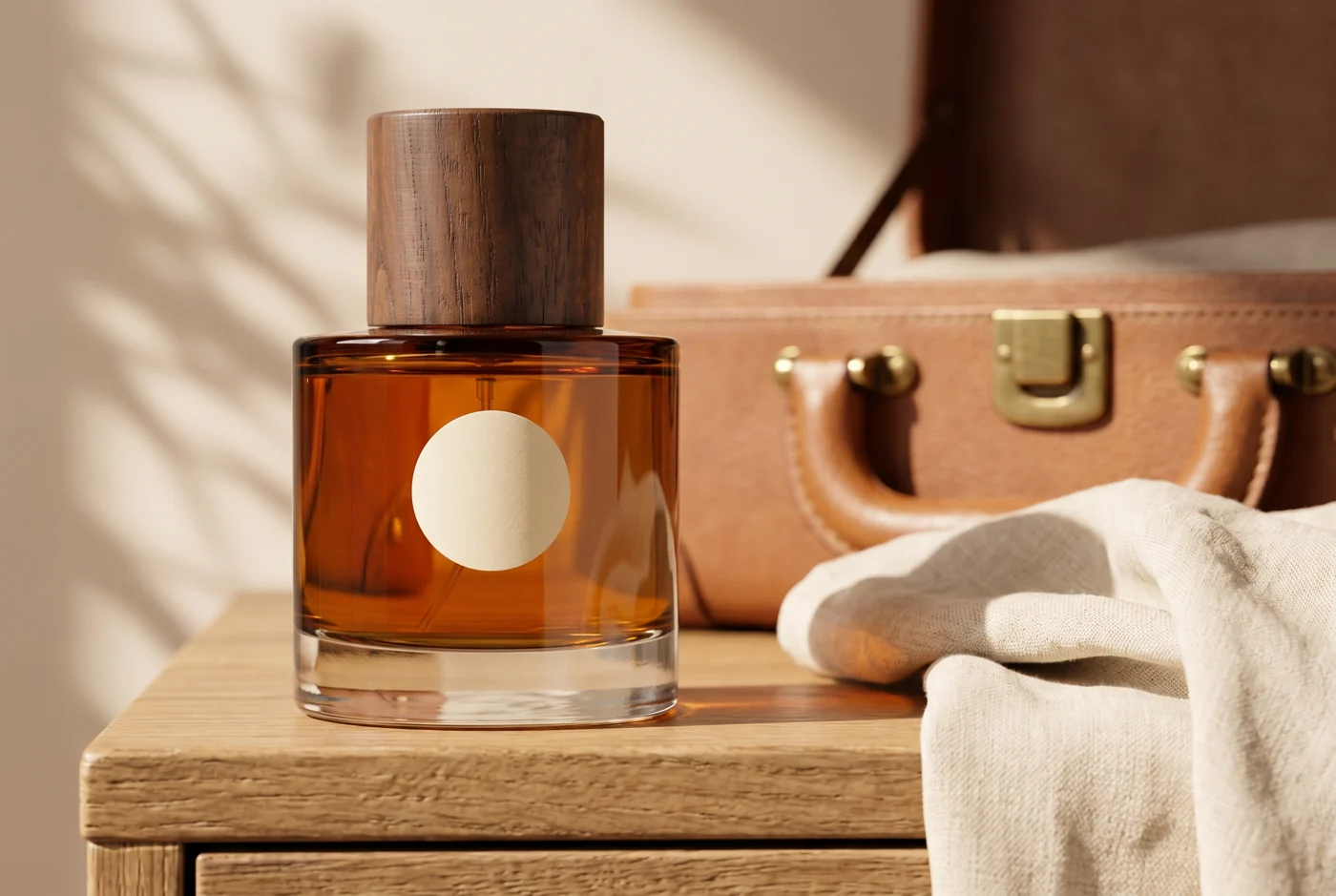
The second completed image used the first bottle as a reference and placed it on a sunlit wooden surface with linen and a travel bag. Compare the cap, label, base and colour using the preceding checklist. A different visual mood is an observed result; conversion and sales were not measured.
 Open full-size visual ↗
A first workflow that limits wasted iterations
The documented starting sequence is Image or Video, a model or feature, a prompt or supported reference, output settings, then Generate. Completed work appears in its creation area and in Assets. Interfaces change, so follow the currently available controls rather than an old screenshot’s exact button positions.
Add a production brief before that sequence. For example: “One landscape image for a product page; retain the product; change only the setting to a morning vanity.” Separating fixed attributes from editable ones makes the next revision specific instead of another vague request for something better.
Review product accuracy before atmosphere. A slightly plain background matters less than a distorted label or changed package size. Reuse a passing image for the next scene and change one major variable at a time. The reusable briefs below are shortened editorial exercises based on our longer execution prompts, not a promise of identical results.
Shortened exercises based on the production brief. Replace the example with material you are authorised to use and define the attributes that must remain fixed.
A studio view that makes the object readable
This fictional example started without a real product photo. For an existing item, start with an authorised reference.
- 01Object
Specify amber glass, clear base, walnut cap and a blank circular label.
- 02Setting
Use a pale stone plinth and soft light from the left to separate the silhouette.
Take the working brief
Use the first output as the reference
Supply the first output through a supported image input and separate fixed product details from scene changes.
- 01Keep
Preserve the bottle proportions, cap, colour and label.
- 02Change
Change the setting to an oak vanity, linen and window light.
Take the working brief
Keep the bottle still and move the camera
Attach your reference first, then separate product preservation from the camera motion you want.
- 01Reference
Attach a product image you have permission to use to a compatible model.
- 02Settings
Check duration, ratio, resolution and the current credit terms before submitting.
Take the working brief
These Korean prompts match the captured practice drafts. Attach reference files separately. They do not guarantee the earlier outputs, a particular quality or a fixed cost.
CASE 3 · Product video: preparing the input
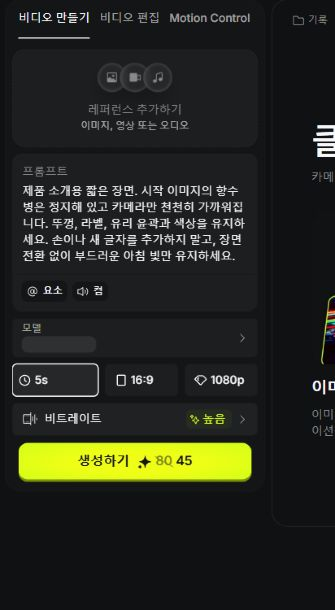
Once a still is ready, add one motion to it. For a first exercise, ask the camera to move toward a stationary bottle instead of combining rotation, splashes and a hand. This is an editorial method for making failures easier to diagnose, not a promise about model performance.
Open Video and Create Video. Choose a model that accepts image input. The observed Seedance 2.5 interface has an Add Reference area for images, video or audio. Attach the product image and distinguish the object that stays still from the camera that moves in the prompt.
Check duration, aspect ratio and resolution before submission. The capture shows 5s, 16:9, 1080p and high bitrate. Choose a supported portrait ratio first if the deliverable is a vertical short. Read the current credit display beside Generate: this capture showed both 80 and 45, so check the applicable account price at execution rather than treating the screenshot as a quote.
The screenshot is a prepared draft without its reference attached. No video was generated for this guide. After a real generation, inspect the entire clip for label changes, moving outlines, intersecting props and the final frame. Simplify one motion at a time when revising an unsuccessful result.
 Open full-size screenshot ↗
Compare the cost of a usable output
A low headline subscription price can be misleading if your preferred model needs repeated attempts. Higgsfield’s help page says generation cost varies with model, resolution and duration and is shown before execution. It also says unused subscription credits do not roll into the next cycle.
Unlimited needs a second look. The help page distinguishes selected website allowances from credit-consuming external execution such as MCP or CLI. Do not budget hundreds of automated generations as free simply because a plan contains the word Unlimited. If a promotion or connected tool displays an exception, check the exact coverage for that execution route.
For this article, the preflight estimated two credits for each image. After the two jobs, the account balance had decreased by four credits in total. We used existing subscription credits without an additional checkout. This is a record of these settings, not a price list for other models, resolutions or video.
Measure the usable output, not merely the generation. In a hypothetical workflow costing two credits per attempt, six attempts with two accepted images cost six credits per accepted image. That is arithmetic for planning, not our measured acceptance rate or a universal model price. Count drafts, retries and final enlargement together.
For the first month, list concrete deliverables and check the model and execution route they require. The price table earlier in this guide records the public screen observed on September 14, 2026 and rechecked on September 29. Prices, promotions and supported models can change; compare the same billing period and credit selection again before checkout.
Different jobs need different uses
An online seller can start from an authorised product photo and compare settings. Hold the object’s features fixed while changing the surrounding mood. A colour or material change that could mislead a buyer is not a harmless creative flourish.
A marketer can explore different visual expressions of one message. Keeping the product, price and offer constant while varying one axis makes a later experiment easier to interpret. Actual eligible visits and conversions are needed to assess performance. Attractive output is not a substitute for campaign evidence.
A blogger or video creator should choose the explanatory job before generating a visual. The perfume bottle belongs in this guide because it makes reference reuse visible. For a real product launch or a news event, authorised documentary photography and official material remain the appropriate evidence.
Commercial use is not blanket rights clearance
Section 4.4 of the reviewed terms says Higgsfield does not claim ownership of your inputs or outputs or restrict commercial use of outputs. That does not give you rights to someone else’s face, music, trademark or photograph. Check both your authority to supply the input and the resulting material.
Before uploading a customer’s face or an unreleased product, check consent and the client agreement. The general terms also discuss using inputs and outputs to improve models. Sensitive client work warrants reviewing enterprise terms and data handling first. Label generated product concepts honestly; do not pass them off as actual photography or customer testimony.
Write down one complete job before paying
“I need three mood images for this week’s launch page” is a more useful starting point than “AI video is popular.” List the source material, fixed product details, output format and retry limit. Then compare official examples and current plan terms against that job.
Higgsfield is worth evaluating as a way to explore visual alternatives. If you have not decided what to make, or only need exact documentary evidence of an object, there is less reason to rush into a subscription. The value arrives when you finish something you can actually use.
After starting: usage, renewal and cancellation
Official help places balances under your avatar → Manage Account → Subscription and history under Manage Account → Usage. Compare the pre-generation quote with recorded usage.
Credit Packs are manual purchases; Auto-Refill triggers extra purchases at a balance threshold. Decide deliberately before enabling it.
The documented cancellation path is Manage Account → Subscription → Plan Settings → Manage Subscription → Show → Cancel Subscription. It stops future renewal and is not an immediate refund of the paid period. Confirm the end date and save needed outputs. We did not cancel an account to write this guide.
If login or entitlement fails, check the original identity before creating more accounts or paying again. Our Google login encountered a service error, preventing new upload-completion captures. Prepared screens and previous real outputs are therefore explicitly distinguished.
How this result was made
- Model
- Requested nano_banana_pro; completion record nano_banana_2
- Run settings
- 2K; 3:2; batch size 1. Job 1: text only. Job 2: the completed first image supplied as reference.
- Recorded runs
- 2
See the input used
JOB 1 [SUBJECT] A fictional unbranded perfume bottle, short rectangular amber glass with softly rounded corners, thick transparent glass base, one small circular ivory label completely blank, a dark walnut cylindrical cap exactly the width of the bottle neck. No real brand or existing product. This is an editorial demonstration of AI-generated advertising photography, not a documentary product photograph. [COMPOSITION] Three-quarter front view of a single bottle on a pale travertine block, centered slightly left in a wide 3:2 frame. The complete bottle visible, simple studio scene, strong focal hierarchy. [LIGHTING] Large softbox at 45 degrees camera-left, 5200K daylight. Narrow rear rim highlights the glass edge. Grounded contact shadow and gentle falloff on warm ivory backdrop. [LENS & CAMERA] 85mm lens, f/8, deep product focus, crisp rounded edges and cap texture. [MATERIALS & TEXTURE] Amber glass refraction, visible walnut grain, porous travertine, clean realistic reflections. [COLOR PALETTE] Warm ivory, amber and deep walnut. Restrained tonal contrast. [STYLE REFERENCE] Precise sculptural product composition, tactile material study, controlled commercial photography. [BRAND INTEGRATION] Fictional unbranded product; understated warm design. [QUALITY MARKERS] Photorealistic, commercial-grade still life. [AVOID] no AI artifacts, no warped or smeared text, no fake words baked into the image, no plastic look, no waxy surface, no cartoonish rendering, no extra fingers, no extra limbs, no melted geometry, no doubled subjects, no oversaturated HDR, no HDR halos, no oversharpened look, no flat fluorescent lighting, no harsh on-camera flash, no generic stock photography poses, no cliché compositions, no random unrelated brand logos, no watermarks, no signatures, no AI sheen on hair or skin, no doll-like rendering, no airbrush look, no flat solid color bands, no empty rectangular areas, no dull gradient zones that look out of place from the rest of the scene. resolution: 2k JOB 2 [SUBJECT] Preserve the single fictional amber perfume bottle from the reference image exactly: same proportions, walnut cap, blank round ivory label, amber glass and transparent base. This is an AI-generated advertising concept, not real product photography. [COMPOSITION] Place the reference bottle on a sunlit oak vanity beside a softly folded cream linen cloth, the corner of an open travel bag in the background. No people. Three-quarter eye-level framing in 3:2, same bottle complete and prominent, one coherent lived-in scene. [LIGHTING] Window light from 45 degrees camera-left at 4800K, gentle broken leaf shadow on the background only, grounded contact shadow under the bottle. [LENS & CAMERA] 50mm lens f/4, bottle completely in focus, background softly separated. [MATERIALS & TEXTURE] Preserve amber glass refraction and walnut grain. Tactile linen and oak, realistic subtle wear. [COLOR PALETTE] Warm ivory, amber and walnut shared with the reference. Rich but natural contrast. [STYLE REFERENCE] Intimate editorial still life with intentional asymmetry, believable window lighting, product-first hierarchy. [BRAND INTEGRATION] Keep original fictional unbranded bottle identity. [QUALITY MARKERS] Photorealistic commercial-grade concept, natural depth. [AVOID] no AI artifacts, no warped or smeared text, no fake words baked into the image, no plastic look, no waxy surface, no cartoonish rendering, no extra fingers, no extra limbs, no melted geometry, no doubled subjects, no oversaturated HDR, no HDR halos, no oversharpened look, no flat fluorescent lighting, no harsh on-camera flash, no generic stock photography poses, no cliché compositions, no random unrelated brand logos, no watermarks, no signatures, no AI sheen on hair or skin, no doll-like rendering, no airbrush look, no flat solid color bands, no empty rectangular areas, no dull gradient zones that look out of place from the rest of the scene. resolution: 2k
Two fictional perfume image jobs completed on September 14, 2026. No physical shoot, video generation or advertising performance test occurred. The first output is rounder than the requested rectangular form; supplying a reference does not guarantee exact product identity. Lens and lighting numbers in the prompts are artistic instructions, not camera capture metadata.
Reader conversation
Community ↗Questions, first-hand results and different perspectives are welcome. Counts reflect real member activity only.
Moderation
Sources and verification notes
- Higgsfield — current creative suite and tool catalogue ↗Checked 2026-09-14
What this source supports
- 1. Sign up: an account is not a subscription
- What job would you actually give Higgsfield?
- Different jobs need different uses
- Higgsfield — How do I create my first generation? ↗Checked 2026-09-14
What this source supports
- A first workflow that limits wasted iterations
- Higgsfield — How do credits work? ↗Checked 2026-09-14
What this source supports
- 2. Read the bill, not only the monthly-looking number
- 4. Turn your workload into a credit budget
- Compare the cost of a usable output
- After starting: usage, renewal and cancellation
- Higgsfield — Terms of Use, sections 4.4 and 10 ↗Checked 2026-09-14
What this source supports
- Commercial use is not blanket rights clearance
- Higgsfield — current pricing and billing options ↗Checked 2026-09-29
What this source supports
- 2. Read the bill, not only the monthly-looking number
- 3. Choose by workload rather than the creator label
- 4. Turn your workload into a credit budget
- Compare the cost of a usable output
- Write down one complete job before paying
- Higgsfield — Marketing Studio ↗Checked 2026-09-14
What this source supports
- What job would you actually give Higgsfield?
- Different jobs need different uses
- Higgsfield Korean image creation interface — observed September 14, 2026 ↗Checked 2026-09-14
What this source supports
- CASE 1 · Build a first product concept from text
- CASE 2 · Keep the product and change the setting
- Higgsfield Korean video creation interface — observed September 14, 2026 ↗Checked 2026-09-14
What this source supports
- CASE 3 · Product video: preparing the input
- Higgsfield — individual and business plan guidance ↗Checked 2026-09-14
What this source supports
- 1. Sign up: an account is not a subscription
- 2. Read the bill, not only the monthly-looking number
- 3. Choose by workload rather than the creator label
- Higgsfield — cancellation and renewal management ↗Checked 2026-09-14
What this source supports
- After starting: usage, renewal and cancellation